Pages

Thursday, 12 April 2012

XenApp 6.5 Step by Step - Step 3 Web Interface

Please check out www.kaztechsolutions.co.uk for more of my technical posts, alternately please call us on 01932 268289. 

Now moving on to Step 3 - Web Interface. 

Now I'm going to keep this really basic Web Interface (WI) installation as this is only a test lab but i may expand on it at a later date.

1.  On the XenApp Server that you installed the WI click on configure.

2.  You will be presented with a blank WI console, click on Create site in the top right corner.

3.  Now I've selected XenApp Services site as i plan to mainly use this WI with a plug in.

4.  Check you are happy with the location of the WI and the name of WI.
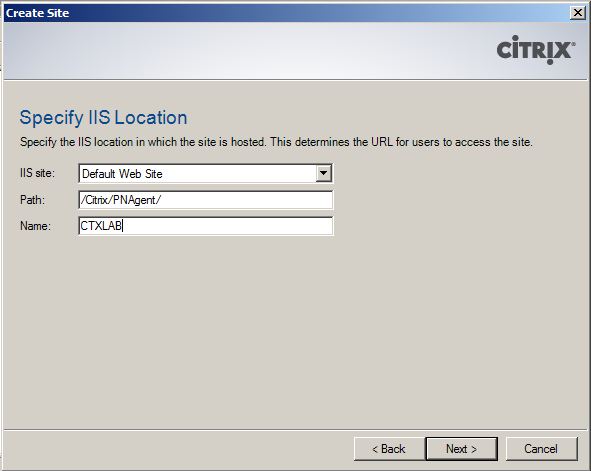
5.  Review your settings and click Next.

6.  Your site should have now been created, click Next to configure your site.

7.  Give you Farm a name (Good idea to give this the same name that you plan to give your XenApp farm) and add in the XenApp server's.  Now I only have one XenApp server at the moment in this environment but you can add to this at a later date, check the XML and transport type and click Next.

8.  Select here you plan to present applications through this WI, now I'm going to be playing with streamed and published applications through this WI so I will select dual.

9.  Click finish.

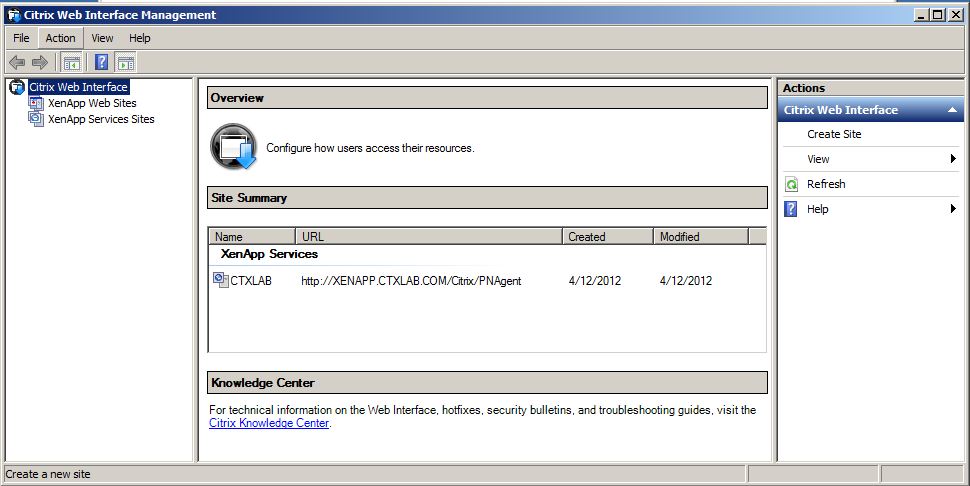
10.  You can now see that a basic WI is now configured and I'll be coming back at a later date to back some amendments. 
Moving on to Step 4 - Configuring the Farm. 

Wednesday, 21 March 2012

XenApp 6.5 Windows Server Customization

Please check out www.kaztechsolutions.co.uk for more of my technical posts, alternately please call us on 01932 268289. 

These are a list of settings that i change to a XenApp server (6 and above) before i start the install of XenApp, if you have a any additional changes that you make please let me know.  A lot of these configurations are taken from the this XenApp guide, XenAppBlog.com and my own experiences.

Configure Windows 2008 R2 with license and IP information.
Apply SP2 and latest windows updates as required.
Setup the page file to run on a drive that doesn't contain any apps - look here for info on setting up page file.
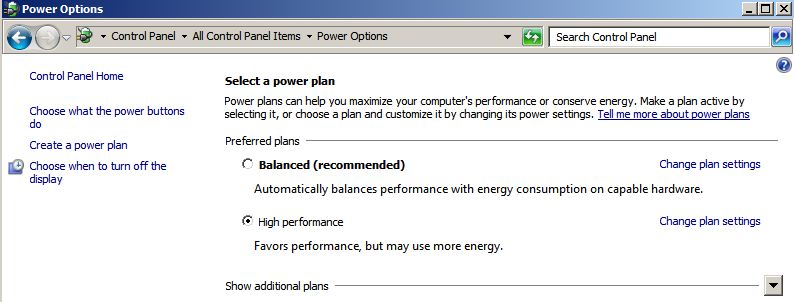
Change power setting to high performance.

Turn off IE ESC (Enhanced Security) through server manager.
Disable Data Execution Prevention on Windows 2008 : bcdedit.exe /set {current} nx AlwaysOff
Disable Windows animated boot : bcdedit /set bootux disabled

Disable Windows Scheduled tasks

  • Application Experience > AitAgent
  • Application Experience > ProgramDataUpdater
  • Autochk > Proxy
  • Customer Experience Improvement Program > everything under this node (Consolidator, KernelCeipTask, UsbCeip, ServerCeipAssistant, ServerRoleCollector, ServerRoleUsageCollector)
  • Defrag > ScheduledDefrag
  • DiskDiagnostic > Microsoft-Windows-DiskDiagnosticDataCollector
  • Power Efficiency Diagnostics > AnalyzeSystem
  • Server Manager > ServerManager
  • Windows Error Reporting > QueueReporting
Configure GPO's for XA Server - 
  • Disable UAC - User Account Control: Detect application installations and prompt for elevation
  • Disable Windows Services through GPO - Windows Firewall, Multimedia Class Scheduler, Network List Service, Network Location Awareness, Windows Defender
  • Disable Windows Updates - Configure Automatic Updates: Disabled
  • Disable Error Reporting - Disable Windows Error Reporting: Enabled
  • Disable CEIP - Turn off Windows Customer Experience Improvement Program: Enabled
  • Disable System Restore - Turn off System Restore: Enabled
  • Disable Printer mappings for RDP sessions - Do not allow client printer redirection: Enabled
  • Use Windows Group Policy Preferences to apply the following registry changes.
Hide System Hard Error Messages - HKLM\System\CurrentControlSet\Control\Windows
“ErrorMode”=dword:00000002
Spooler Warning Events - HKLM\System\CurrentControlSet\Control\Print\Providers
“EventLog”=dword:00000001
Paging of the Executive - HKLM\System\CurrentControlSet\Control\Session Manager\Memory Management
“DisablePagingExecutive”=dword:00000001
Registry Lazy Flush Interval - HKLM\System\CurrentControlSet\Control\Session Manager\Configuration Manager\
“RegistryLazyFlushInterval”=dword:00000060 (dec)
Worker Threads - HKLM\System\CurrentControlSet\Control\Session Manager\Executive\
“AdditionalCriticalWorkerThreads”=dword:00000064 (dec)
SMB 1.0 Client Optimization Note: Tuning SMB 1.0 is required in mixed (2003 / 2008 R2) environments, where SMB 2.0 cannot be used.
HKLM\SYSTEM\CurrentControlSet\Services\Lanmanworkstation\Parameters

"MaxCmds"=dword:00002048 (dec)
HKLM\SYSTEM\CurrentControlSet\Services\MRxSmb\Parameters
"MultiUserEnabled"=dword:00000001
HKLM\SOFTWARE\Microsoft\Windows\ CurrentVersion\Policies\Explorer
NoRemoteRecursiveEvents”=dword:00000001
HKLM\SYSTEM\CurrentControlSet\Services\ Lanmanserver\Parameters
"MaxWorkItems"=dword:00008192 (dec)
"MaxMpxCt"=dword:00002048 (dec)
"MaxRawWorkItems"=dword:00000512 (dec)
"MaxFreeConnections"=dword:00000100 (dec)
"MinFreeConnections"=dword:00000032 (dec)
SMB 2.x Client Tuning - HKLM\System\CurrentControlSet\Services\ LanmanWorkstation\Parameters
“DisableBandwidthThrottling"=dword:00000001
“DisableLargeMtu”=dword:00000000
HKLM\SOFTWARE\Microsoft\Windows\ CurrentVersion\Policies\Explorer
"NoRemoteRecursiveEvents”=dword:00000001
Disable Logon Screensaver - HKEY_USERS\.DEFAULT\Control Panel\Desktop
"ScreenSaveActive"="0"

And remember to optimize your Av as well using the following Citrix guide.


For more XenApp registry changes have a look at XenApp 6 Tuning GPO for Windows 2008 on XenAppBlog.com

NOTE:  Once you have your GPO setup the way you like it take a backup of it using GPMC for future use, as once you have these settings configured within a GPO you can simply import these settings back in.

Monday, 19 March 2012

Disable Language Bar

Please check out www.kaztechsolutions.co.uk for more of my technical posts, alternately please call us on 01932 268289. 

One thing i do like to do on all my XenApps Server's is to disable the language bar through the reistry on each XA server. 

Registry Key: HKEY_LOCAL_MACHINE/System/CurrentControlSet/Control/Citrix/wfshell/TWI
Value Name: SeamlessFlags
Value Type: REG_DWORD
Value: 0x40000


http://support.citrix.com/article/CTX101644 


Enabling Desktop Viewer on XA and XD

Please check out www.kaztechsolutions.co.uk for more of my technical posts, alternately please call us on 01932 268289. 

Some times you may notice that the desktop viewer bar is not avaliable when you connect to a XD or XA but you can enable this with the following to ensure that the Desktop Viewer bar is always used for XD session while you have implemented the preceding change for a single Web Interface site that contains both XenDesktop farm and XenApp farm.


  • Ensure that the c:\inetpub\wwwroot\citrix\SiteName\conf\default.ica file does not contain a line ConnectionBar=0 or ConnectionBar=1
  • If you require an app to show as a desktop change the following .conf file


  • Ensure that the c:\inetpub\wwwroot\citrix\SiteName\conf\webinterface.conf file has the line, ShowDesktopViewer=On. The default content for this line could be #ShowDesktopView=Off.

Wednesday, 14 March 2012

XenApp 6.5 Planning

Please check out www.kaztechsolutions.co.uk for more of my technical posts, alternately please call us on 01932 268289. 

I always find when doing any kind of Citrix deployments whether it be test labs, pre-production or live systems there is an awful lot to consider before you even start to plan your roll out - and rightly so. A lot of this is for my own use and just to jog my memory form time to time and also to make sure i don't miss anything out of the planning side of things. If you would like to add something to this or let me know the way you go about planning a XenApp 6.5 please let me know.


Hardware and Software considerations
  • What hardware will you be using? How much RAM does the server, what are the CPU's and their spec, what disks are going to be used and their speed.
  • Windows licensing? What edition of OS are you going to be using? Std, Ent or DataCenter.
  • Do you have your Windows RDS licensing?
  • What OS do you plan to install XenApp on and is it 32bit of 64bit?
  • What hypervisor do you plan on using? XenServer, VMware, Hyper-V?
  • What Citrix Licensing do you have and what model do you have? Concurrent or user/device? 

Application/User Considerations
Networking Considerations 

XenApp Server Configuration Considerations
Installing XenApp

Configuring XenApp
- Are you joining an existing farm or a new one?
- If creating a new farm have the name and domain ready.
- Select the data store database type and connection information.
- Do you have the database credentials?
- Are you going to use shadowing?
- What server mode and zone name?
- Do you have the licensing information?
XenApp Security
Migration Considerations

Friday, 18 November 2011

XenServer - Lost interfaces

Please check out www.kaztechsolutions.co.uk for more of my technical posts, alternately please call us on 01932 268289. 

I recently ran in to an issue where in my XenServer test environment i seemed to lose all 4 of the NICs that was in my XenServer and the XenServer host could not be seen in XenCenter.

Looking at it closer when in XSCONSOLE and you looked at the management interface section you would get a message back saying "no interfaces present" and in the CLI if you were to run a xe pif-list you would get a message back saying "Host is still booting".

If you were to also run a ifconfig on the XenServer host would would even get back a list of all eth's, bond, xapi and xebr's.

I found out that running the xe pool-emergency-transition-to-master would resolve this issue. Once you have run this command wait around 30 seconds and then restart the host and it was now able to be seen within XenCenter.

Friday, 28 October 2011

Runas VBS script

Let me start by saying that by no means im a scripting guy this is more for my own needs. copy all the below test in to notepad and save as a VBS.

Option explicit
Dim oShell
set oShell= Wscript.CreateObject("WScript.Shell")
oShell.Run "RunAs /noprofile /user:domain\administrator ""c:\path\to\prog.exe""",2 "use the ,2 to minimize the DOS box that will run your program"
WScript.Sleep 500
oShell.Sendkeys "PASSWORD~" "remember to keep the ~ as this sends an enter after your password"
Wscript.Quit

Tuesday, 25 October 2011

Find memory/CPU reservation on all VMs

To retrieve the settings for reservation of both memory and CPU run the following PS script

## retrieve the values for MemReservationMB for the given VMs
Get-Cluster "myCluster" | Get-VM | Get-VMResourceConfiguration | select VM,MemReservationMB


## retrieve the values for CPUReservationMhz for the given VMs
Get-Cluster "myCluster" | Get-VM | Get-VMResourceConfiguration | select VM,CPUReservationMhz


If you want to go through a set all VM memroyCPU reservations to "0" run the following

## set the MemReservationMB to 0 for given VMs
Get-Cluster "myCluster" | Get-VM | Get-VMResourceConfiguration | Set-VMResourceConfiguration -MemReservationMB 0 -Confirm:$false


## set the CPUReservationMhz to 0 for given VMs
Get-Cluster "myCluster" | Get-VM | Get-VMResourceConfiguration | Set-VMResourceConfiguration -CPUReservationMhz 0 -Confirm:$false

Tuesday, 4 October 2011

VMware PS Script to export Datastores Information

Get-View -ViewType Datastore | %{
$_ | Select Name,
@{N="Location";E={$_.Summary.Url}},
@{N="Type";E={$_.Summary.Type}},
@{N="Hosts Connected";E={$_.Host.Count}},
@{N="VMs Connected";E={$_.Vm.Count}},
@{N="Capacity";E={"{0:n2} GB"-f ($_.Summary.Capacity/1GB)}},
@{N="Provisioned";E={"{0:n2} GB"-f (($_.Summary.Capacity - $_.Summary.FreeSpace + $_.Summary.Uncommitted)/1GB)}},
@{N="Free";E={"{0:n2} GB"-f ($_.Summary.FreeSpace/1GB)}}
} | Export-csv ("c:\VMreports\Datastore-"+$a+".csv")

Thursday, 8 September 2011

XenApp 6 Event ID 1 error

Hi you run in to the following error on your XenApp server's do the following

Event Type: Error
Event Source: WSH
Event Category: None
Event ID: 1
Date: 2008-02-18
Time: 20:26:38
User: N/A
Description:
Citrix Generate License Performance Data:
Error calculating license information:
Received error: 0x800a0005: Invalid procedure call or argument


1. Go to your License server.
2. Go into C:\Program Files\Citrix\Licensing\LicWMI
3. Make a backup of Citrix_Licensing_WMI.mof - Make sure the backup does NOT have a .mof extension.
4. Open Citrix_Licensing_WMI.mof in Notepad.
5. Remove HostingModel = "LocalServiceHost";
6. Open CMD.exe, change to the dirirectory listed in step 2, run the following command:
for /f %s in ('dir /b *.mof *.mfl') do mofcomp %s